Functional mapping
Functional mapping of your machines
From your diagrams alone, Mimorian builds a knowledge graph of the equipment: a functional model that links components, functions and connections. The machine becomes legible and navigable, instead of staying a binder of documents.
Mimorian's functional mapping is a knowledge graph of the equipment: a model that links the components, functions, diagrams and history of a machine to make it navigable and diagnosable, from your technical documents alone.

The core problem: a documented machine is not a legible machine
Diagrams sit as static attachments in the CMMS. Documentation ages faster than the machine itself: components replaced by equivalents, new failure modes, field workarounds never recorded.
At diagnosis time, the technician falls back on binders and trial and error, because no tool links a component to its neighbours or its functions. Understanding how the machine works remains expert knowledge, held in a few heads and written down nowhere.
This is the gap functional mapping fills: making the machine intelligible, so that reasoning rests on the real equipment rather than on a generality.
What Mimorian does with your diagrams
From your technical documents, Mimorian builds a living model of each piece of equipment in the fleet, then enriches it at every intervention.
Reading of electrical, pneumatic and hydraulic diagrams
Mimorian analyses your diagrams and extracts the components, their references and their connections. Content buried in PDFs becomes structured, usable data.
A knowledge graph of the equipment
Components, functional connections, functions and threshold values are linked into a living graph. This is the foundation that lets you trace a symptom back to its cause.
A structured component inventory
Each component carries its reference, type and tag, and gives access to its history. A machine's bill of materials stops being a frozen spreadsheet and becomes a maintained reference.
Documentation linked to each component
Diagrams, manufacturer notes and manuals are attached to the relevant components. The technician reaches the right documentation page from the component, without pulling out the binder.
Voice updates, on the floor
The technician adds or edits a component by describing it by voice. The graph stays faithful to the real machine as parts are replaced, with no keyboard entry and no form.
A search for alternatives to obsolete components
When a reference is no longer available, Mimorian suggests equivalents and checks their functional compatibility on the graph. The search for a replacement part starts from the machine's real need.
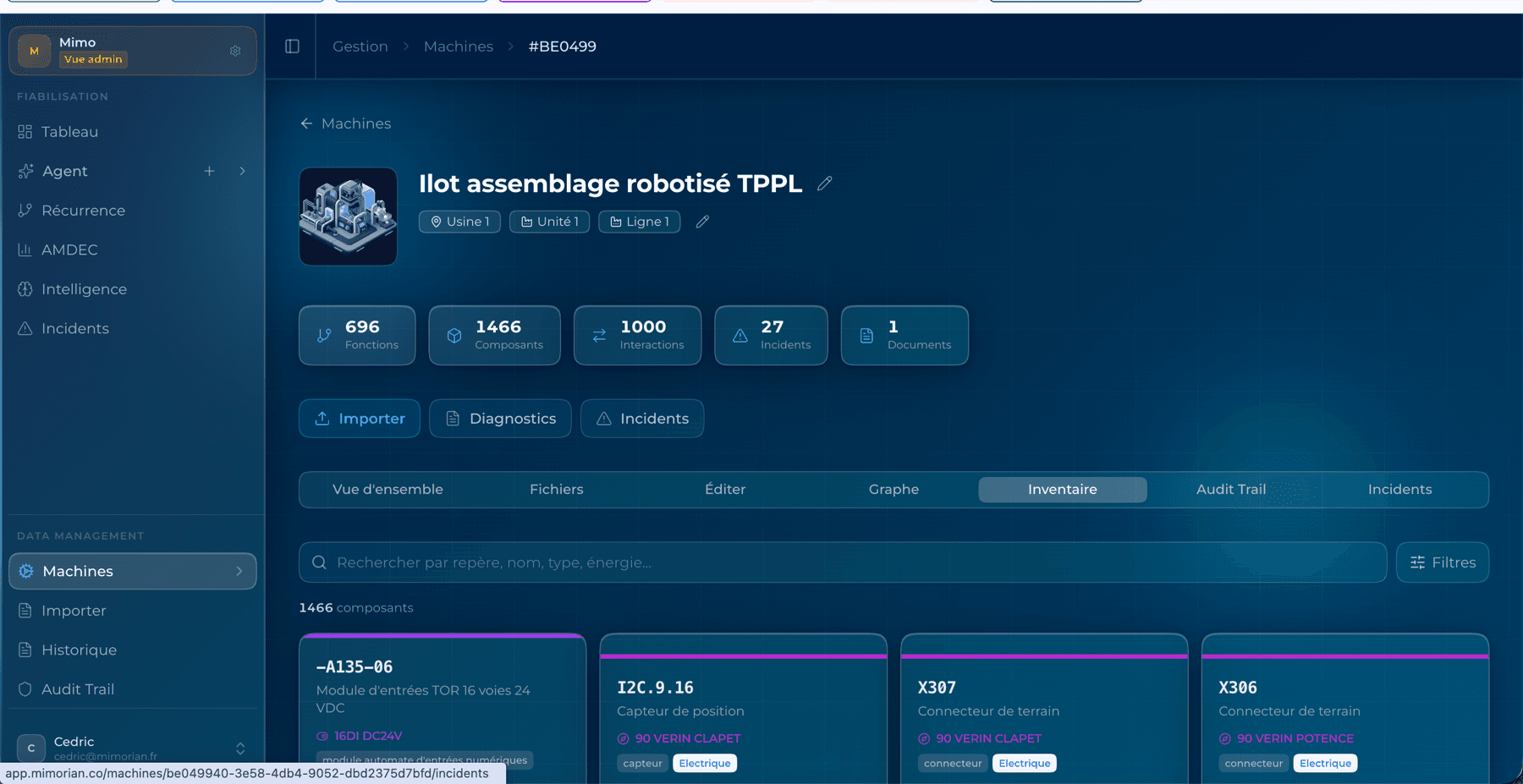
Close to a digital twin, without the 3D or the sensors: a model built for diagnosis and maintenance, not for physical simulation.
How Mimorian maps your equipment
From your technical documents to a navigable map of your equipment, in three steps.
You upload your documents
Diagrams, manufacturer notes, datasheets, manuals, in their existing formats. Mimorian ingests them.
The AI maps the equipment
Several AI models analyse the documents in parallel and cross-reference the sources to extract components, functions and connections.
The machine becomes navigable
Each component is linked to its documentation, its incident history and its dependencies. The technician navigates the machine like a map.
Functional mapping or digital twin: what is the difference?
Both model a machine, but not for the same purpose. The digital twin simulates physics; functional mapping makes the machine legible for maintenance.
Who functional mapping serves
Field technician
He consults the diagram and gets a component's exact tags without pulling out the binder, mid-intervention.
Production operator
He accesses a part's history and its documentation before even calling maintenance.
Maintenance manager
He has an equipment reference kept up to date, faithful to the real machine after every replacement.
Fits into your existing stack
Functional mapping runs alongside your existing tools, as a ready-to-use SaaS. It complements your orchestration layer.
Mapping, the foundation of Mimorian's diagnostics and knowledge capture
The equipment graph is the foundation on which AI-guided diagnostics and maintenance know-how capture rest: every piece of know-how and every diagnosis attaches to a component of the graph. See it in action in the use case of restarting a machine idle for 18 months.
Frequently asked questions about functional mapping
What is the difference between a digital twin and Mimorian's functional mapping?
A conventional digital twin simulates the physical behaviour of a machine from IoT sensors and a 3D model. Mimorian's functional mapping simulates nothing: it builds a knowledge graph that links a piece of equipment's components, functions and diagrams to make it legible and diagnosable. It is a twin built for maintenance, not for design.
Do you need to install IoT sensors to use Mimorian?
No. Mimorian builds the mapping from your existing technical documents: electrical, pneumatic and hydraulic diagrams, manufacturer notes, manuals. No sensors and no additional instrumentation are needed to get started.
What does Mimorian build a machine's mapping from?
From your diagrams and technical documentation. Mimorian analyses them, extracts the components, their references and their connections, then enriches this graph at every intervention. The result is an equipment reference kept up to date, faithful to the real machine.
How do you make a machine understandable for maintenance with AI?
By modelling the machine as a knowledge graph: each component linked to its functions, its documentation and its failure history. The technician then navigates the machine like a map rather than searching through a binder. This is what Mimorian's functional mapping produces.
Other Mimorian features
Knowledge capture
Maintenance know-how capture
Every intervention enriches the plant's memory. Know-how stops leaving with the people who hold it.
ExploreGuided diagnostics
AI-guided diagnostics
From symptom to root cause. Targeted hypotheses, verifiable tests, and reasoning visible at every step.
ExploreRecurrence
Recurrence analysis and reliability
The failures that keep coming back, ranked by occurrence and grouped by cause. A reliability agent targets the actions that cut downtime.
ExploreKnowledge-loss risk
Knowledge-loss risk
Who holds the experience for each machine, and where your plant is exposed at the next departure.
ExploreSee the mapping of one of your machines
Show us a piece of equipment that gives you trouble. We will show you what Mimorian makes of it in 30 minutes, from your own diagrams.